Lambda Audio / PluginsAudio effects by Josh Reed01–06 / 2026

Six plugins
for Mac and Windows.

Audio effects for mixing and sound design. Each one has a free 30-day trial.

LILT / PLUG-IN04 · PITCH VIEW
Lilt editor with the pitch display, the note strip and the tuning controls
Lilt's
pitch display.
CLICK IMAGE
FOR FULL SIZE ↗
FOR MAC AND WINDOWSBACK TO LAMBDA AUDIO ↗
THE PLUGINS01 / WHICH ONE

Which one
do you need?

Mutation is for building your own chain of effects. Overtone makes bass easier to hear on phones and laptops. Contour makes room for a vocal or a kick when two tracks fight. Lilt tunes vocals. Tame turns down harsh, ringing sounds. Undertone adds sub-bass under a bass, kick or 808.

01 / 06EFFECT CHAINSCOMING WITH 1.0

Mutation.

Build your own effect chain.

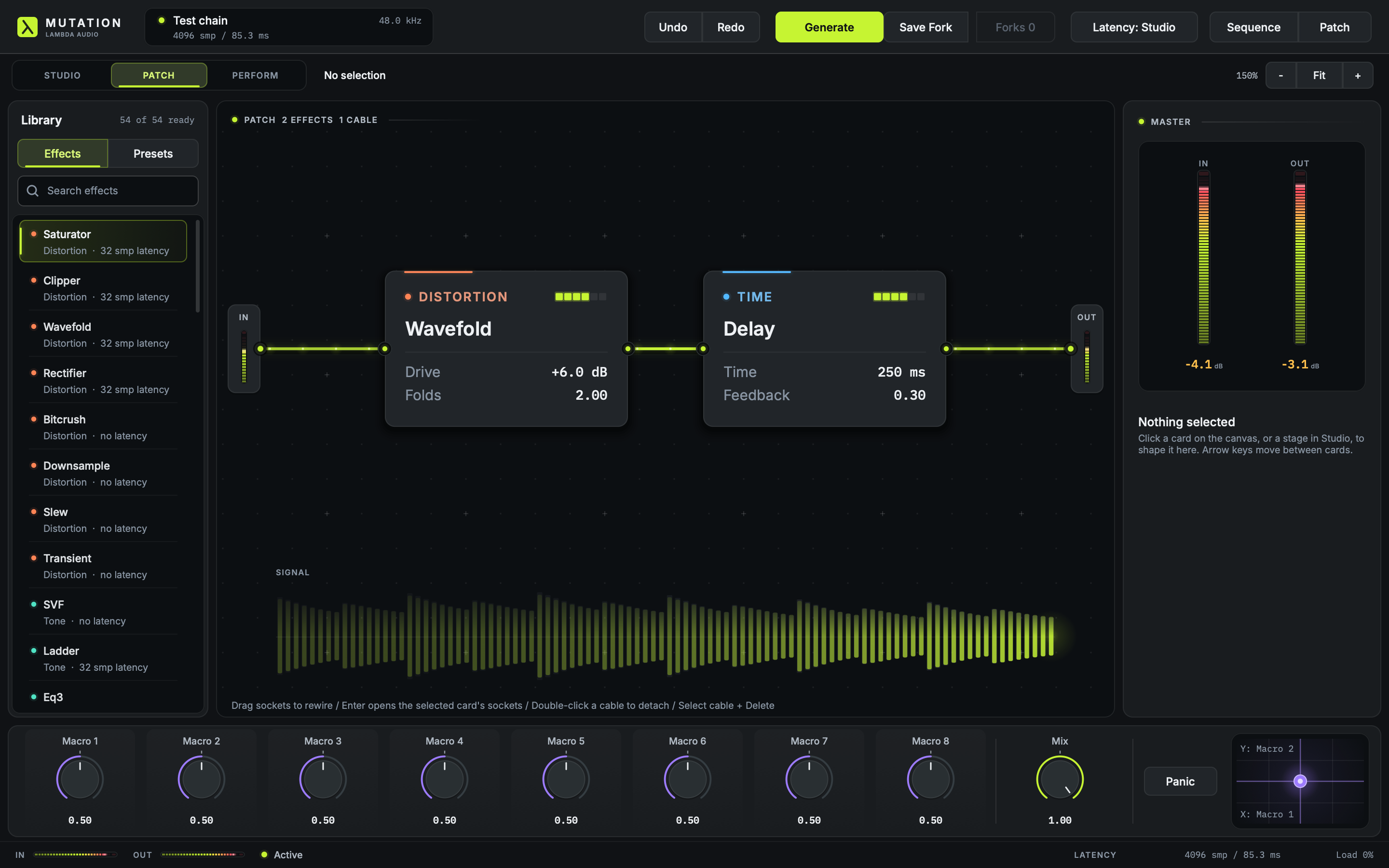
Choose from 54 effects and connect them in any order, one after another or split into parallel paths. Make knobs move on their own with LFOs, or play them with eight macros. Press Generate for a random chain to start from. There are over a hundred presets, and you can save your own.

54 EFFECTSCABLESLFOS + MACROSXY PAD
Read the guide
Mutation Patch view with Wavefold and Delay nodes, routing cables, meters, and macro controls
PLUG-IN WINDOW / PATCH VIEWOPEN IMAGE ↗
02 / 06BASS ON SMALL SPEAKERS
Overtone editor with the input spectrum, added harmonics, meters, and the Focus, Amount, Character and Output controls
PLUG-IN WINDOW / OVERTONEOPEN IMAGE ↗

Overtone.

Bass that sounds big on good speakers can vanish on a phone or laptop. Overtone adds higher tones that follow the bass, so you can still hear it there, and leaves your original low end alone. Focus picks which notes it works from and Amount sets how much it adds. Match Level lets you compare with and without it at the same volume.

Read the guide
FOCUS / AMOUNT / CHARACTERCOMING WITH 1.0
03 / 06ROOM IN THE MIX
Contour editor with input, key and reduction curves, meters, carve and detector controls, and the Ceiling
PLUG-IN WINDOW / CONTOUROPEN IMAGE ↗

Contour.

Put Contour on the track that gets in the way and send it the track that matters, such as a vocal. While the vocal plays, Contour turns down the frequencies the two share. The rest of the track stays as it was. A ceiling stops the output from clipping.

Read the guide
SIDECHAIN / FREEZE / CEILINGCOMING WITH 1.0
04 / 06VOCAL TUNINGNEW · COMING WITH 1.0

Lilt.

Pitch correction for vocals.

Lilt tunes one vocal to the song's key, to notes you play on a MIDI keyboard, or to a melody you draw. Retune sets how quickly notes snap into place, from instant and robotic to slow and natural. Live mode adds almost no delay, so you can sing through it while you record. Twelve presets give you somewhere to start.

DRAW NOTESMIDI KEYBOARDFOUR SOUNDSLIVE MODE
Read the guide
Lilt editor with the pitch display, the note strip, and the Tuning, Vibrato and Voice and output controls
PLUG-IN WINDOW / PITCH DISPLAYOPEN IMAGE ↗
05 / 06HARSHNESS CONTROLNEW · COMING WITH 1.0

Tame.

Turns down harsh, ringing sounds.

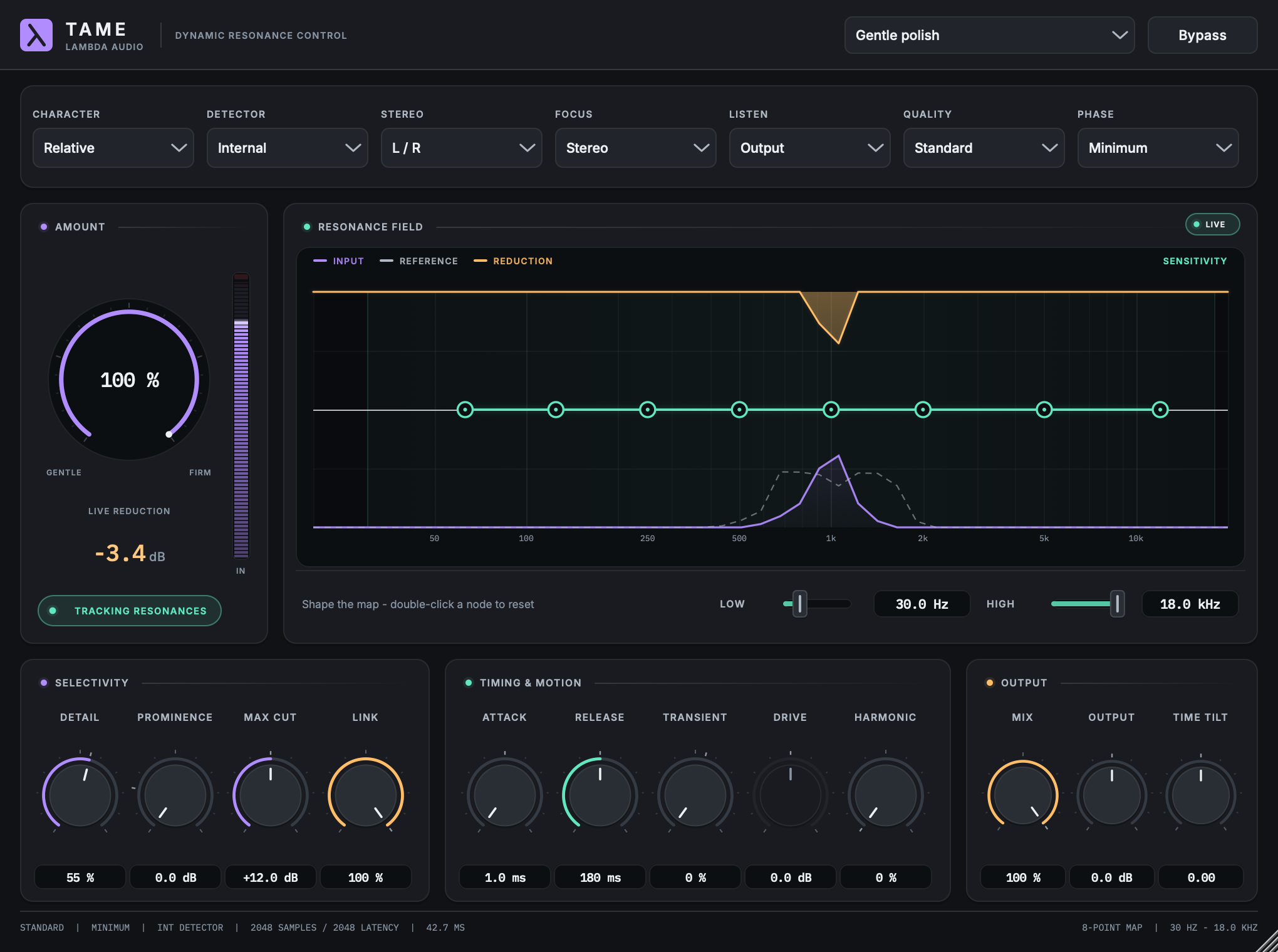
Tame listens for frequencies that ring out harshly, turns them down while they ring, then lets go. Drag the Sensitivity Map to show it where to listen, and switch to Delta to hear what it takes away. It comes with 58 presets for vocals, guitars, drums and full mixes.

SENSITIVITY MAPHEAR WHAT IT CUTS58 PRESETSLOW-DELAY MODE
Read the guide
Tame editor tracking a resonance near 1 kHz, with the input spectrum, the reduction it applies, the Sensitivity Map and the Amount control
PLUG-IN WINDOW / TAMEOPEN IMAGE ↗
06 / 06SUB-BASS GENERATORNEW · COMING WITH 1.0

Undertone.

Deep sub-bass under your low notes.

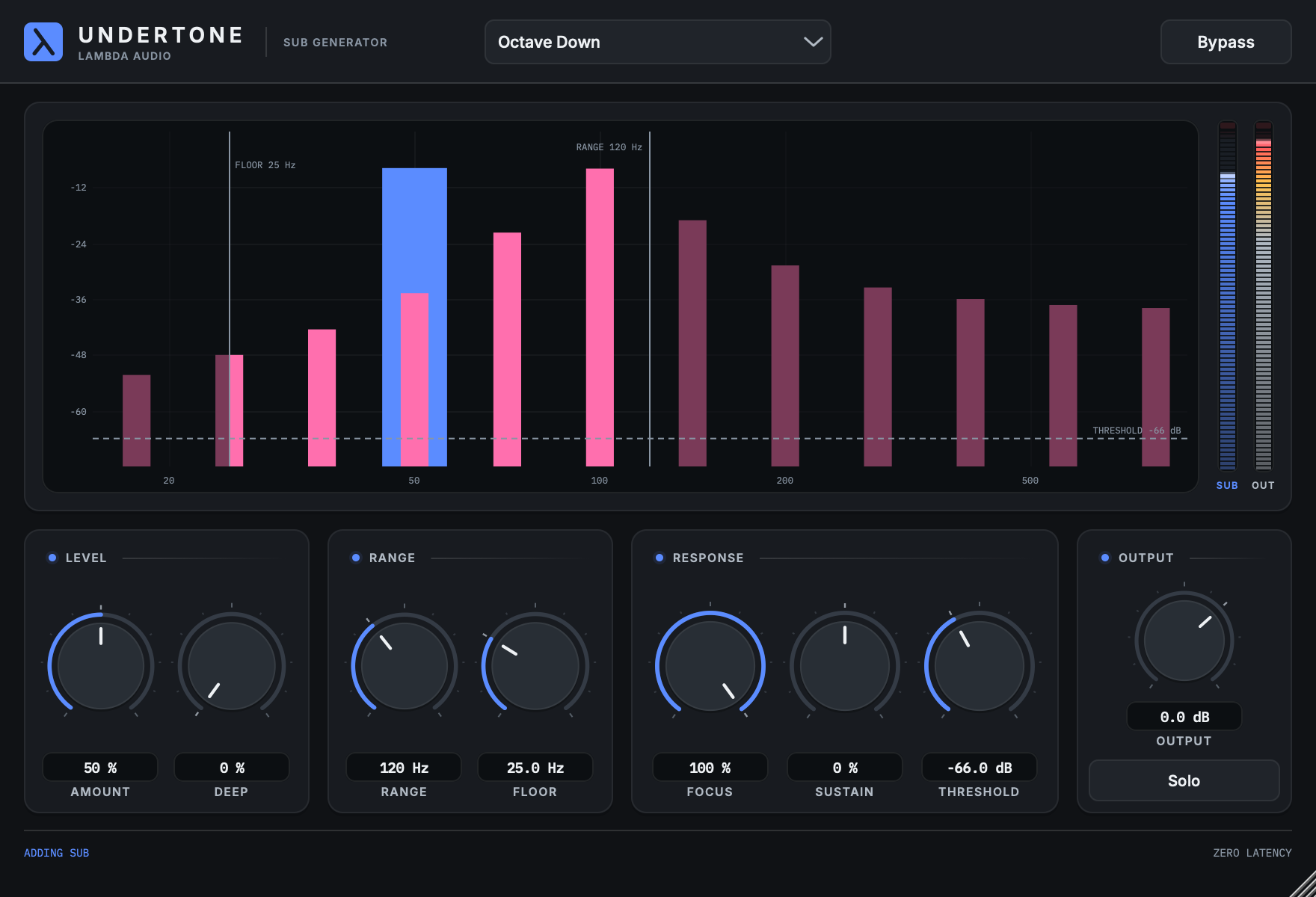
Undertone adds a sub-bass note one octave below a bass, kick or 808, and if you want, a second one two octaves down. It follows each note as it moves, and your original sound stays as it was. Amount sets how loud the sub is, Range and Floor set which notes get one, and Solo lets you hear the sub by itself. It adds no delay.

OCTAVE DOWNTWO OCTAVES DOWNSOLO THE SUBNO DELAY
Read the guide
Undertone editor with the sub display, the SUB and OUT meters and the Level, Range, Response and Output controls
PLUG-IN WINDOW / SUB DISPLAYOPEN IMAGE ↗
AVAILABILITYCOMING WITH 1.0

All six come out with 1.0.

The public betas are over. Mutation, Overtone, Contour, Lilt, Tame and Undertone come out together.

COMING WITH 1.0

Try any of them free for 30 days.

  • All six at once.Lilt, Tame and Undertone are new. Mutation, Overtone and Contour were in the beta.
  • Logic Pro and GarageBand.Every plug-in also comes as an Audio Unit, the format those apps use. For now the Audio Unit is experimental. If it gives you trouble, we'll help until it works.
  • Installers.Install one plug-in or all six. The installer puts everything in the right place.
  • Free trial.Each plug-in runs free for 30 days with every feature. You sign in with a free Lambda Audio account and buy when you're ready. When a trial ends, the plug-in lets your audio through untouched, so your projects still open and play.

Prices and the launch date will go up here. Supported: VST3 on a Mac with Apple silicon and macOS 13 or newer, and on 64-bit Windows 10 or 11. Everything else, including the Audio Unit, is experimental.

ABOUT THE PLUGINS1.0 / 2026

Try them on
your own music.

Every plug-in has a short guide to get you started. Back up important projects before you try anything new on them.

Back to Lambda Audio